
Grammar Check by AI Writing
Metaverse LabsEducation
4.3619.00 Reviews
- Version
- 2.0.0
- Installs
- 1.00M
- Age Rating
- Everyone
Screenshots
Our Review of Grammar Check by AI Writing
 Analysis by Appyee
I get the most from a grammar checker when I treat it as a second pass, not as the person in charge of my writing. That is the approach I would take with Grammar Check by AI Writing: draft in my own voice, use its suggestions to spot possible issues, then make the final decisions myself. It is an education app from Metaverse Labs, and its focus is practical—helping me check wording, correct mistakes and look up language as I work.
That distinction matters because a tool can catch a misplaced comma without knowing what I meant to emphasize. I find a checker most useful when I have a real draft in front of me and a specific goal, such as making a message easier to understand or checking whether a sentence reads cleanly. Used that way, it can save attention for the parts of writing that need human judgment.
Getting Started with Grammar Check by AI Writing
Downloading the app was a breeze. A quick search in the app store, a tap on the install button, and I was ready to roll. Right off the bat, the interface struck me as clean and intuitive. No unnecessary frills, just a straightforward design that makes it easy to navigate. I appreciated this simplicity, especially when I'm in the middle of a writing project and need tools that don’t slow me down.
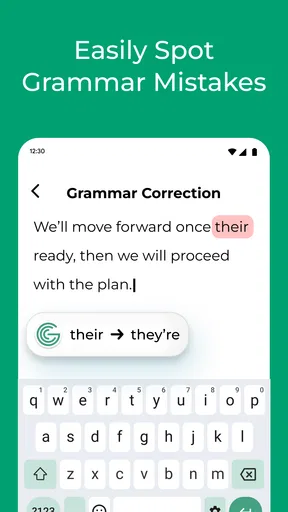
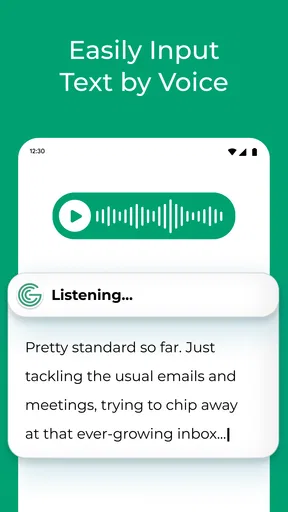
Once you open the app, it's pretty much like having a grammar guru right in your pocket. You can either type directly into the app or copy-paste your text. I tried both methods, and they worked seamlessly. The app immediately highlights potential errors, offering suggestions for corrections. It’s like having a grammar teacher look over your shoulder—but without the pressure.
A steady workflow beats accepting every change
For a short note, I would type or paste the text, review the flagged spots from top to bottom, and then read the whole thing again without looking at the suggestions. That final read catches a problem a correction list cannot: a technically tidy sentence that no longer sounds like me. On a longer draft, I would work through one section at a time so that a suggested change does not pull me away from the point I was trying to make.
A useful habit is to separate mechanical checks from voice decisions. I would first look at spelling, punctuation and obvious grammar, then consider wording or style suggestions only if they make the meaning clearer. If a recommendation changes the emphasis, I would keep the original. This is a small workflow choice, but it prevents a checker from sanding away a deliberate phrase just because a plainer one seems safer.
Features That Caught My Eye
The Grammar Check by AI Writing app isn’t just about spotting mistakes; it goes a step further by explaining why something might be incorrect. This feature is super handy for those of us who want to improve our writing skills and understand the "why" behind each correction. It’s like getting a mini grammar lesson every time you use the app.
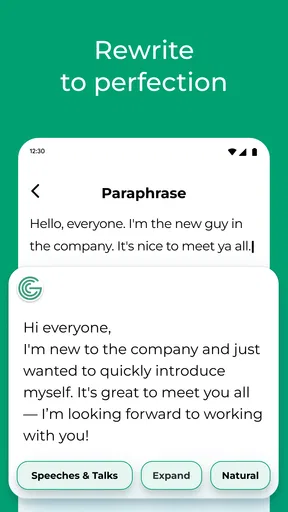
Another feature I found helpful is the style suggestions. These are not just about grammar but also about making your writing more engaging and effective. The app suggests alternatives to overused words and helps you avoid passive voice, making your text more dynamic.
For the multitaskers out there, the app supports multiple languages and can adjust to different writing styles, whether you’re crafting an academic paper or a casual blog post. This versatility makes it a fantastic tool for anyone who writes in various contexts.
Settings, shortcuts and repeatable habits
I would check the app’s available settings before relying on it for a regular writing routine. In particular, it is worth noticing which language and style are active before reviewing a passage, especially if I move between schoolwork, workplace messages and informal writing. I would not assume that every suggestion fits every audience: a formal alternative may improve a report but make a friendly note sound stiff.
For speed, I would keep the source text ready to paste and review suggestions in small batches rather than stopping after every sentence to reconsider the entire draft. I would also keep an untouched copy of anything important before making a series of edits. That way, I can compare the cleaned-up version with my first wording and restore a phrase if the revised one loses a useful nuance. These habits are more dependable than expecting any writing assistant to make the judgment call for me.
Real-World Testing
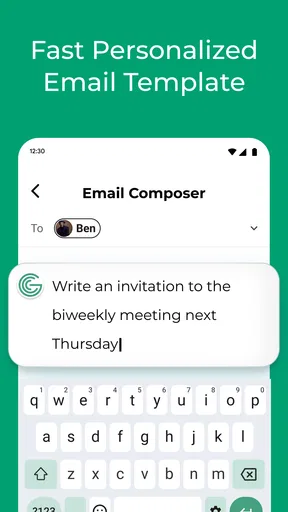
I decided to put the app to the test by running a few different types of documents through it. First up was an email I had drafted for a client. I was impressed by how the app caught not just the basic typos but also more subtle errors, like incorrect comma usage.
Next, I tried it on a blog post draft. Here, the style suggestions really shone through. The app pointed out where I could tighten my prose, suggested synonyms for overused words, and even flagged areas where my tone could be more consistent. It’s like having a second pair of eyes, ensuring that my writing is not only correct but also impactful.
Where it fits—and where it does not
A realistic everyday use is a message I have drafted quickly between other tasks: perhaps a note to a colleague explaining a change, or an email where a missing word could make the request confusing. I would paste it in, deal with clear errors first, and then check that the final version still says exactly what I intend. For a student, the explanations can make a correction more useful than a silent fix, provided the student uses them to learn rather than simply submitting whatever the app produces.
Compared with checking a sentence in a dictionary or searching for a grammar rule online, an app-based review is convenient because it keeps the draft and suggestions together. A dictionary is still better when I need a precise definition or want to compare meanings, while a general document editor may be the better choice if I mainly need to write and format a complete document in one place. I see this app as a focused checking step, not necessarily a replacement for every writing tool I already use.
It will suit people who write frequent short messages, learners who want explanations, and anyone who benefits from a quick review before sharing a draft. I would be more cautious about relying on it for specialist terminology, a carefully argued academic passage or text where legal, technical or personal nuance matters. In those cases, I would use the checker for surface issues and ask a knowledgeable person to review the meaning. No correction suggestion can take responsibility for whether a claim is accurate or appropriate.
Real limits to keep in mind
The app is free to install, but it includes in-app purchases, with listed items ranging from $3.99 to $99.99. I would check what an optional purchase offers and whether it matches my routine before paying; a person who only checks the occasional email may have little reason to spend, while a frequent user may value features they use regularly. The current version is 1.9.39, and it runs on Android 7.0 or later. It is rated for Everyone, so its intended audience is broad, although younger users should still follow the guidance of a parent or teacher when using writing tools for schoolwork.
Its public reception gives a useful, though not decisive, point of reference: the app has a 4.2 average from around 23,000 ratings, with about 585 written reviews and over 1 million installs. I would treat those figures as context rather than proof that every suggestion will suit my writing. A high-level score cannot tell me whether the app’s style choices fit a particular assignment, workplace or language-learning goal.
Where It Could Improve
No app is perfect, and Grammar Check by AI Writing is no exception. While its suggestions are generally spot-on, there were a few instances where it seemed a bit too eager to suggest changes. I had to remind myself to trust my instincts and not blindly accept every recommendation. That said, the app provides explanations for its suggestions, so you’re not left in the dark about why a change is recommended.
I also noticed that while the app excels in English, its performance in other languages isn’t quite as robust. If you’re multilingual, you might find its capabilities a bit limited outside of English.
That limitation changes how I would use its language support. I would check a short, familiar passage first and judge the suggestions against what I know, rather than sending a high-stakes translation through and assuming it is correct. For a text in a language I am still learning, explanations may help me notice patterns, but I would verify uncertain choices with a trusted reference or fluent reader. The practical test is not whether a tool claims to handle a language; it is whether its corrections consistently preserve the meaning I intended.
Final Thoughts
Overall, Grammar Check by AI Writing is a fantastic tool for anyone looking to improve their writing. Whether you’re a student, a professional, or just someone who likes to write, the app offers valuable insights that can help polish your work. While it’s not a substitute for a professional editor, it’s a great first line of defense against grammar gremlins.
If you’re in need of a reliable grammar checker, this app is definitely worth a try. It’s like having a writing assistant at your fingertips, ready to help you craft your best work. So, why not give it a shot and see how it can elevate your writing?
My recommendation comes with one condition: use it as a helper, not an authority. If I wanted a simple way to review everyday writing and learn from some of the corrections, I would give it a try. If I needed detailed editorial feedback, dependable specialist-language guidance or a final human check on an important document, I would choose a more tailored review alongside it. That balance is what makes the app useful without asking it to do a job it cannot do.
Verdict
Strengths of Grammar Check by AI Writing
- Accurate grammar correction.
- User-friendly interface.
- Supports multiple languages.
- Real-time suggestions.
- Integrates with other apps.
Limitations of Grammar Check by AI Writing
- Limited offline functionality.
- Subscription required for premium features.
- Occasional false positives.
- Ads in free version.
- Requires stable internet connection.
Other Releases by Metaverse Labs
View All
GB4 Emulator: Retro Gameboy
Tools4.3

Gamuroid: Retro Game Emulator
Tools4.4

Hue Light App Remote Control
House & Home4.2
Similar Picks in This Category
View All
Duolingo: Language Lessons
Duolingo4.7

Google Classroom
Google LLC2.8

Unacademy: Learn & Crack Exams
Unacademy3.2

Bible App for Kids
Life.Church4.4

Cake - Learn English & Korean
Cake Corp.4.7

Brainly: AI Homework Helper
Brainly4.5
Frequently Asked Questions
What features does Grammar Check by AI Writing offer?
Grammar Check by AI Writing offers a comprehensive suite of tools designed to enhance your writing. It includes grammar and spelling checks, style suggestions, and readability improvements. The app also provides context-based corrections and supports multiple languages, making it a valuable tool for writers aiming for precision and clarity.
Is Grammar Check by AI Writing suitable for professional use?
Yes, Grammar Check by AI Writing is designed to cater to both casual and professional users. With its advanced algorithms, it ensures high accuracy in detecting errors and suggesting improvements, making it ideal for business communications, academic writing, and content creation where precision and professionalism are crucial.
Does the app require an internet connection to function?
Grammar Check by AI Writing primarily operates online to access its powerful AI algorithms and language databases. However, it may offer limited offline capabilities depending on the version. For the most accurate and up-to-date corrections, an internet connection is recommended to fully utilize the app's features.
How user-friendly is Grammar Check by AI Writing for beginners?
The app is designed with a user-friendly interface, making it accessible for beginners. It offers intuitive navigation and provides real-time suggestions as you write. New users can easily understand its functionalities due to clear instructions and helpful tutorials included within the app, ensuring a smooth experience.
What are the subscription options for Grammar Check by AI Writing?
Grammar Check by AI Writing typically offers both free and premium subscription plans. The free version provides basic grammar and spelling checks, while the premium plan unlocks advanced features such as style suggestions, in-depth feedback, and enhanced support. Subscriptions can be monthly or annually, depending on user needs.
